Free invoice generator for contractors — no signup, no document limits
Type the client, the lines and the rates; BidPaper adds it up in exact cents and turns it into a PDF right in your browser. No account, no document limit, no card processing bolted on, and nothing you type is uploaded.
How it works
Pick your trade, or start blank
12 trades ship a priced line-item library — HVAC, plumbing, electrical, roofing and more — so the rows you bill most often are already there. Or open the builder empty and type your own.
Fill in the client and the lines
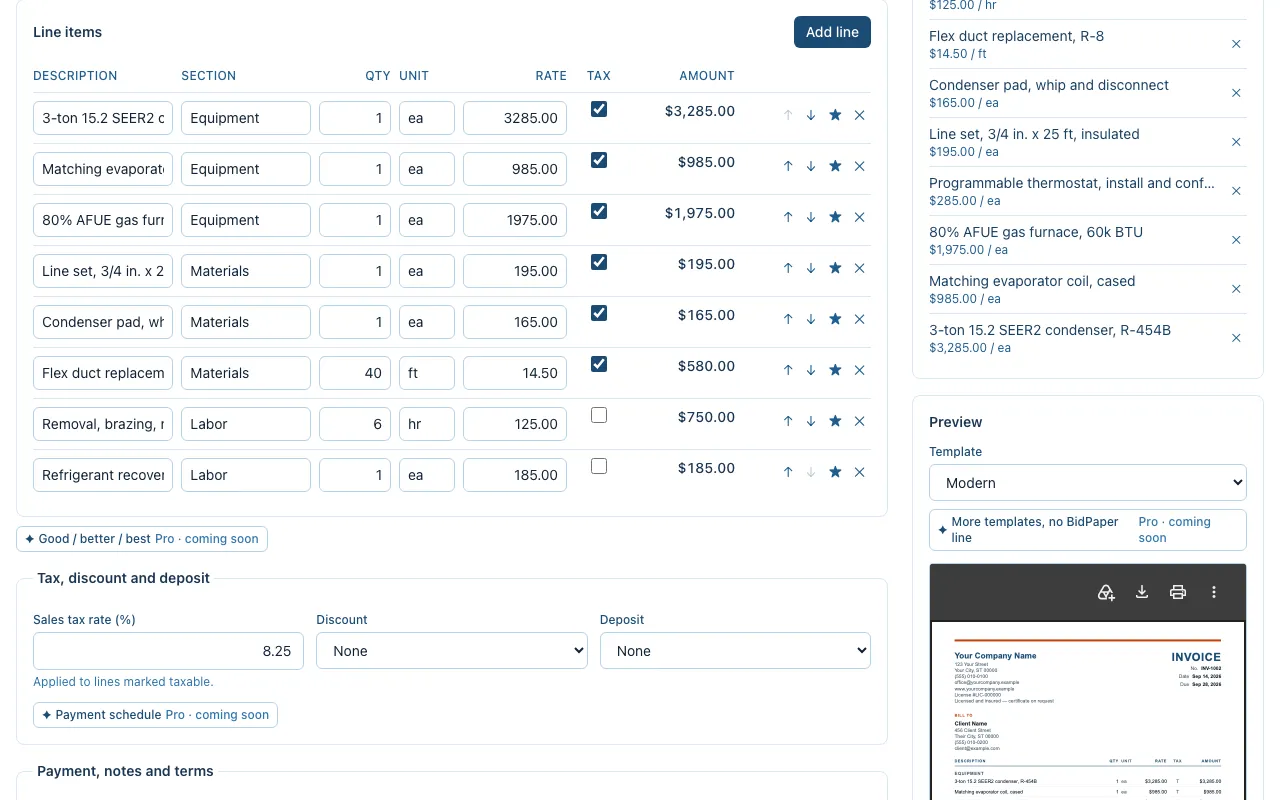
Quantities, units and rates. Tick which lines are taxable, add a discount or a deposit, and the totals recompute as you type — in whole cents, so the PDF never shows a rounding error.
Download the PDF
The invoice is rendered in your browser and saved to your downloads. Send it however you already send paperwork — email, text, or print it and leave it on the kitchen counter.
What the free invoice generator includes
Exact totals
Money is computed in whole cents, never floating point. Subtotal, tax, discount and balance due add up on paper the way they add up in your head.
Sales tax, discount and deposit
Set the tax rate once and tick which lines it applies to. Take a percentage or a fixed amount off, ask for a deposit, and the balance due updates as you type.
Two PDF templates
Modern or Minimal, both carrying your business details, license number and payment instructions. A one-line "Made with BidPaper" credit sits in the footer; Pro (coming soon) removes it.
Line-item libraries and your own price book
Every trade starts with priced rows for its common work. Star a line to keep it in your library, and it is one click away on the next job.
Saved clients and a backup you own
Save a client once and load them onto the next invoice. Export a JSON backup of every document, client and price-book entry whenever you like — the data is yours.
Invoice from an estimate
Build the estimate first, win the job, then convert it. The client and every line carry over, and the invoice keeps the estimate number under an INV prefix so the two reconcile.
Start from your trade's template
Each one opens with its line items already priced, and comes with a sample invoice you can download first.
- HVAC invoice template
Equipment, refrigerant, permits and startup — priced the way changeouts actually run.
- Plumbing invoice template
Fixtures, code upgrades and the access problems that only appear once the wall is open.
- Electrical invoice template
Panel capacity, code-required protection and the license number that has to be on the page.
- Roofing invoice template
Squares, tear-off layers, decking allowance and the two warranties customers confuse.
- Painting invoice template
Coats, prep and sheen — the three things that make two painting bids incomparable.
- General contracting invoice template
Allowances, draw schedules and change orders — the paperwork remodels actually run on.
- Landscaping invoice template
Install versus maintenance, plant warranties, and who owns the watering.
- Flooring invoice template
Subfloor condition, waste factor and the transitions nobody counts until install day.
- Carpentry invoice template
Rough versus finish, material grade, and rot you cannot price from the driveway.
- Concrete invoice template
Yards, PSI, reinforcement and finish — plus the excavation nobody bid.
- Drywall invoice template
Finish levels, texture match, and the repair that is never just one patch.
- Handyman invoice template
Minimums, punch lists and knowing which jobs need a licensed trade instead.
Questions
- Is the invoice generator really free?
- Yes — unlimited invoices, PDF export and local storage, with no document cap. The ads on the guide and template pages pay for it; the builder itself shows none. A Pro tier is planned at $12/month or $99/year for extras such as your logo on the PDF, and it will never gate how many invoices you can make.
- Do I need an account or an email address?
- No. There is nothing to sign up for and nothing to confirm. Fill in the invoice and download it; the next one starts with your business details already in place, because they are remembered on this device.
- Where does my data go?
- Nowhere. The invoice is built and rendered in your browser, and nothing you type is sent over the network. The flip side is that it lives in this browser's storage: clear site data or switch devices and it is gone, so export a backup from time to time.
- Can I make the invoice from an estimate I already sent?
- If you built the estimate here, yes: open it from the saved list and click Convert to invoice. Client, line items, tax and deposit carry over, and the invoice keeps the estimate's number with an INV prefix so the two reconcile at a glance.
Make your invoice now
Opens the builder with a blank invoice. No signup, and everything stays in this browser.
Create an invoice